
Declarative schema vs migration scripts
Your database changes live in a pile of migration scripts. 001, 002, 003 — on and on, a new one every release. And the only way to know what your schema actually looks like right now is to replay every one of them, in order, and trust nobody skipped a step.
Hey folks. I’m Forge Barrett, master of the Content Forge here at SchemaSmith. Today I want to show you a different way to think about database changes — declarative schema management — and why it cuts drift down to almost nothing.
The way you probably do it today
Section titled “The way you probably do it today”Migration scripts have earned their keep. Flyway, Liquibase, EF migrations, hand-rolled SQL — under the hood they all work the same way. You write the steps: add this column, alter that type, drop this index. Each change is a new script, run once, in order. That’s the imperative approach — you spell out every strike of the hammer.
And it works. Until it doesn’t.
Where it cracks
Section titled “Where it cracks”Your scripts describe the journey, not the destination. Want to know what the orders table is supposed to look like right now? You can’t just open one file and read it. You have to replay the whole history in your head — script 1, then 12, then that hotfix back in 47.
Miss one. Run two out of order. Let someone patch prod by hand at 2 a.m. Any of those, and your environments quietly pull apart. Dev doesn’t match staging. Staging doesn’t match prod. And nobody’s quite sure why. That gap has a name — drift — and it’s where the worst deployment surprises come from.
The shift
Section titled “The shift”Declarative flips it. Instead of writing the steps, you declare the end state: here’s exactly what the orders table should be. One file. The source of truth, sitting in version control right next to your app code. You don’t write the ALTER. You describe the destination and let the tool find the road.
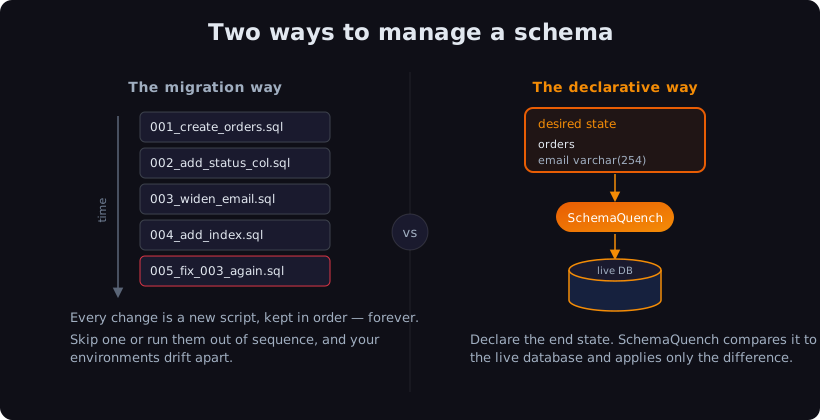
That’s what SchemaSmith does when you quench. It reads your declared state, looks at what’s actually on the live database, and works out the difference. Then it applies only that difference — no more, no less. Add a column to your definition, and it adds the column. Change nothing, and it does nothing. Run it ten times in a row and the database lands in the exact same place every time.
No replaying history. No drift between environments. No guessing what prod really looks like — your repo already says.
Now, look — I’m not knocking migration scripts. They served their purpose. But you don’t have to hand-script every strike anymore. Declare the shape you want, and let the forge do the shaping.
Check yourself: In one sentence, what does SchemaSmith compare to decide what to change?
Your declared desired state against the database’s current state — it generates and applies only the difference.
Declarative is the difference between writing down every hammer blow and just showing the smith the finished blade. You describe what done looks like; SchemaSmith converges the metal to match.
Got a migration setup you’re trying to picture in this new way? Email me at forgebarrett@schemasmith.com — I read every one.
Next up: Module 1 — Install & connect. We get the CLI installed and pointed at a sandbox database so you can quench for real.
Until then, may your desired state and your real state be one and the same.
— Forge