
Stop porting migrations, extract your state
You’ve got a folder full of migration scripts. V1, V2, V3, all the way up to some number you stopped looking at a long time ago. Every one of them ran once, in order, and now they’re history you can’t change — and a database state nobody can see in one place.
Hey folks. I’m Forge Barrett, master of the Content Forge here at SchemaSmith.
If you’re coming from Flyway, Liquibase, EF Core migrations, SSDT, or a drawer full of hand-rolled scripts, this course is your on-ramp. I’m gonna show you how to move to SchemaSmith without porting a single migration — and how the concepts you already know map onto the declarative way.
Migrations describe the trip. Declarative describes the destination.
Section titled “Migrations describe the trip. Declarative describes the destination.”A migration tool records every step you took. Add a column here, drop an index there, backfill a value — each change is a script, and the running order is the truth. To know what your schema is, you replay the whole trip in your head.
SchemaSmith works the other way around. You declare the state you want — this table, these columns, this index — and the engine figures out the difference between that and the live database, then closes the gap. No step list. No running order. Just the shape, and a tool that makes the metal match it.
That’s the whole mental shift. Stop describing the trip. Describe the destination.
You don’t port your migrations. You walk away from them.
Section titled “You don’t port your migrations. You walk away from them.”Here’s the part that saves you a week. Your database already is the sum of every migration you ever ran. The trip is over — the shape is sitting right there on the server.
So you don’t translate a hundred migration scripts into declarative files by hand. You point SchemaTongs at the database your old tool built, cast its current state to files, and you’re declarative. One command. The migration history stops mattering the moment you have the state.
And that old bookkeeping table — flyway_schema_history, DATABASECHANGELOG, __EFMigrationsHistory, whatever your tool tracked itself with? You leave it behind. When you extract, you name the tables you’re keeping; the tracker isn’t invited. Then you quench once: SchemaSmith adopts your existing tables, leaves everything else exactly where it sits — including that dead tracker — and the next run does nothing at all. You’re managing forward, and the old ledger is just an inert table you can drop whenever you feel like it.
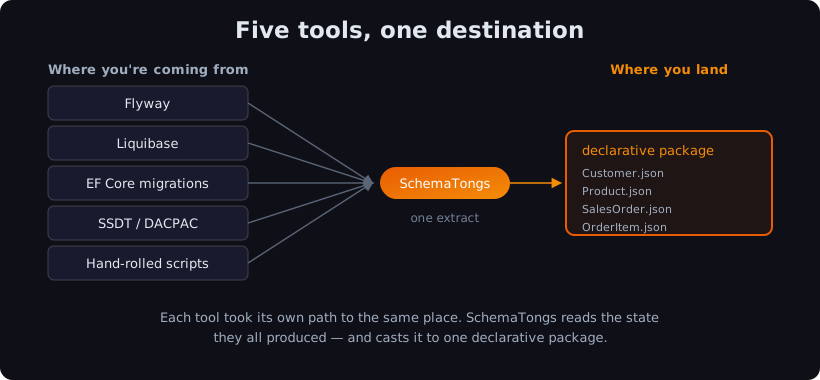
SchemaSmith keeps its own bookkeeping, sure — but unlike a migration history, you never touch it, never order it, never debug it. You trade a ledger you maintain for one you forget exists.
This is a cookbook — flip to your tool
Section titled “This is a cookbook — flip to your tool”The rest of this course doesn’t tell one story front to back. It’s a cookbook: one self-contained module per source tool. Read your tool’s concept-for-concept mapping, run the extract against a database that tool built, watch it converge. Work the one you came from — or read them all to see how five different histories land on the same declarative shape.
- Module 1 · Migrating from Flyway — versioned
V__scripts andflyway_schema_history, mapped and left behind. - Module 2 · Migrating from Liquibase — changesets, contexts, and the two
DATABASECHANGELOGtables. - Module 3 · Migrating from EF Core migrations —
Migrations/*.cs, the model snapshot, and__EFMigrationsHistory. - Module 4 · Migrating from SSDT / DACPAC — already declarative; here’s what changes (SQL Server only).
- Module 5 · Migrating from hand-rolled scripts — the numbered-script pile and your home-grown version tracker.
New to SchemaSmith? You’ll want the CLI on your PATH first — Course 1, Module 1 walks the install and the connection in a couple of minutes. Come back here when schemaquench --version answers.
Check yourself: Why don't you need to port your migration scripts to move to SchemaSmith?
Because your database already reflects the cumulative result of every migration you ever ran — the current state is the sum of the trip. SchemaTongs extracts that state into declarative files, so you carry the destination forward instead of replaying the steps. The old migration history, and the bookkeeping table that tracked it, get left behind.
Here’s the thing. All those migration scripts were the path you took to shape the metal. But once it’s forged, the path doesn’t matter — only the shape does. SchemaSmith reads the shape you’ve already got and carries it forward, clean.
Coming off a tool I haven’t named, or sitting on a migration setup you’re not sure how to move? Email me at forgebarrett@schemasmith.com — I read every one.
Next up: Course 5 · Module 1 — Migrating from Flyway, where we point SchemaTongs at a Flyway-built shop and leave flyway_schema_history cold in the ashes.
Until then, may you leave your old ledger cold in the ashes, and carry only the shape that matters into the new fire.
— Forge