
Fan out templates across databases and schemas
It’s tenant number forty-one. You open the runbook, find the per-tenant setup script, swap in the new schema name, run it, eyeball the output, and move on. Then number forty-two next week. Then a release ships a new column and now you’re back to forty-one scripts to run one at a time — and the day you forget tenant nineteen is the day tenant nineteen files the bug. Hand-enumerating targets doesn’t scale, and worse, it drifts: the list in your head is never the list in the database. Let’s stop keeping the list. Let’s make the tooling find the work.
Two questions every template answers
Section titled “Two questions every template answers”In Module 1 you drew boundaries with products. A template is the thing inside a product that actually shapes objects — the mold you press your tables, indexes, and scripts out of. What makes a template powerful isn’t the objects it defines; it’s that one definition can deploy to many targets in a single run. That’s the fan-out.
Two scripts on a template decide the targets, and they answer two different questions:
DatabaseIdentificationScriptanswers which databases? It’s a SQL query returning database names. The template deploys into every database the query returns — that’s multi-database fan-out. Point it at a catalog query and one run can shape a whole fleet of databases.SchemaIdentificationScriptanswers which schemas? It’s a SQL query returning schema names, run inside each database the first script picked. The template then deploys its full object set into each schema it found.
A template that carries a SchemaIdentificationScript has a name: it’s a schema template. That second script is the switch. Without it, a template runs once per database. With it, the template fans out across schemas too — one deployment per discovered schema, every run.
{{SchemaName}} — the per-iteration token
Section titled “{{SchemaName}} — the per-iteration token”Here’s the piece that makes a schema template tick. On every schema the fan-out visits, {{SchemaName}} resolves to that schema’s name. So the same table definition lands as acme.Customers on one iteration and beta.Customers on the next, with no copies of the file.
That’s why a schema template’s table JSON omits the Schema property entirely. A normal table file names its own schema; a schema-template table file can’t — the schema isn’t known until the fan-out reaches it. Leave Schema out, and {{SchemaName}} supplies it per iteration. One file, every tenant.
And because both identification scripts are re-read on every run, the target list is never stale. Add a database, add a schema, retire one — the next ordinary deploy sees the change because it asks the live query again. You never edit the package to change who gets the deploy. You change the data the query reads.
The multi-tenant case: a registry drives the fan-out
Section titled “The multi-tenant case: a registry drives the fan-out”The cleanest place this lands is multi-tenancy. You’ve got a tenant per customer, each in its own schema — acme, beta, globex — and every tenant gets the same workspace: a Customers table, a Contacts table, the same indexes and foreign keys. The naive version is one setup script per tenant. The forged version is one schema template whose target list is a query against your own data.
That query reads a registry table. The lab ships a Tenants table and points the schema template’s SchemaIdentificationScript straight at it:
SELECT [Name] FROM dbo.Tenants WHERE [Status] = N'Active'Active tenants, by name. That’s the whole target list — and it’s authoritative because it lives in the database, not in your memory or a wiki. The lab also sets CreateSchemaIfMissing: true, so the fan-out provisions each discovered tenant’s schema as it goes. (Production setups often provision schemas through a separate onboarding path and set this false; for a from-scratch sandbox, letting the fan-out stand up the schemas is the clean choice.)
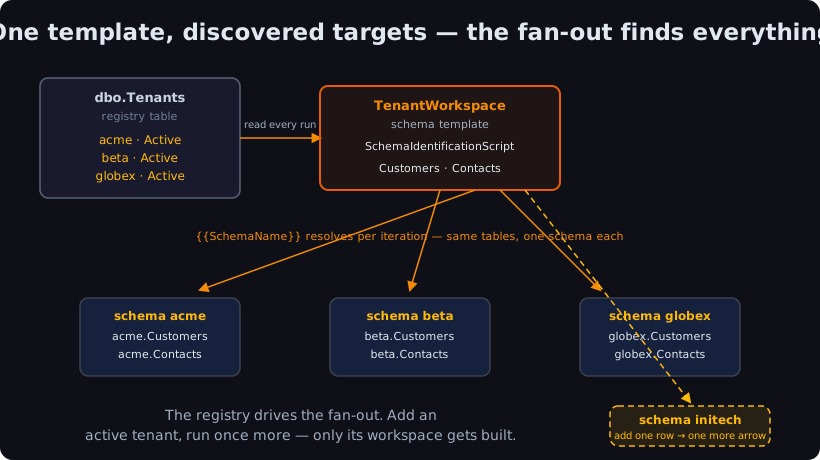
One template declaration. Three tenants today, forty tomorrow. You never name them in the package — the registry names them, and the template finds them.
Watch one run fan out
Section titled “Watch one run fan out”The lab ships a single product, TenantCRM, with two templates: a regular Shared template that creates the Tenants registry and seeds three active tenants, then the TenantWorkspace schema template that fans out per tenant. One command runs both:
schemaquench --ConfigFile:deploy.settings.jsonShared goes first and stands up the registry. Then TenantWorkspace reads it, discovers three active tenants, and dispatches one work unit per tenant — a single run, three schemas, six tables:
Quenching Template: TenantWorkspaceTemplate 'TenantWorkspace': 3 units - db: DatabaseIdentificationScript; schema: SchemaIdentificationScript[localhost,11433].[learn] [Schema: acme] Creating schema [acme] (CreateIfMissing: true)[localhost,11433].[learn] [Schema: acme] Adding new table [acme].[Customers][localhost,11433].[learn] [Schema: acme] Adding new table [acme].[Contacts][localhost,11433].[learn] [Schema: acme] Successfully Quenched[localhost,11433].[learn] [Schema: beta] Successfully Quenched[localhost,11433].[learn] [Schema: globex] Successfully QuenchedCompleted quench of TenantCRMRead the [Schema: <tenant>] prefix on every line — that’s how you read a fan-out in the log. The rollup above it tells you why those units exist: schema: SchemaIdentificationScript, three of them. The template found acme, beta, and globex, created each schema, and pressed the same two tables into all three. One run, every tenant. (Per-tenant, the same two facts ride in the deployment summary report as databaseSource and schemaSource.)
PostgreSQL does the same job in its own dialect: Creating schema "acme" (CreateIfMissing: true), Create new table acme.customers (PostgreSQL folds identifiers to lowercase), and per-tenant foreign keys like Add missing foreign key beta.contacts.fk_contacts_customers. The mechanics are identical; only the wording shifts. (Tenants quench in parallel, so the order they interleave in varies run to run — don’t read meaning into the sequence.)
The aha: add a tenant, run once more
Section titled “The aha: add a tenant, run once more”This is the heart of the module. Onboard initech the way you onboard any tenant now — add a row to the registry — then run the exact same deploy:
schemaquench --ConfigFile:deploy.settings.jsonThe identification script gets re-read, now returns four tenants, and the fan-out dispatches four work units. But watch which one actually builds anything:
[localhost,11433].[learn] [Schema: initech] Creating schema [initech] (CreateIfMissing: true)[localhost,11433].[learn] [Schema: initech] Adding new table [initech].[Customers][localhost,11433].[learn] [Schema: initech] Adding new table [initech].[Contacts][localhost,11433].[learn] [Schema: acme] Successfully Quenched[localhost,11433].[learn] [Schema: beta] Successfully Quenched[localhost,11433].[learn] [Schema: globex] Successfully Quenched[localhost,11433].[learn] [Schema: initech] Successfully QuenchedOnly initech shows Creating schema and Adding new table. The three existing tenants reach Successfully Quenched with no DDL between dispatch and completion — their declared state already matches, so the difference is zero. That’s the idempotence you met in Course 1, now fanned out across a fleet: SchemaSmith deploys declared state, not steps, so a tenant whose schema already matches is a no-op every single run.
You onboarded a tenant with one row and the deploy you already run. No new package. No per-tenant script. No list to maintain. The registry is the list, and the template finds it.
Schemas within a database — so SQL Server and PostgreSQL
Section titled “Schemas within a database — so SQL Server and PostgreSQL”One honest scope note. A schema template fans out across schemas inside one database — namespaces like acme and beta living together in the learn database. That needs an engine where a schema is a distinct object inside a database, and SQL Server and PostgreSQL both have exactly that: CREATE SCHEMA carves a namespace within the current database.
MySQL works differently — there, a “schema” is a database (CREATE SCHEMA and CREATE DATABASE are synonyms), so there’s no in-database schema axis to fan out across. The equivalent multi-target move on MySQL is fanning out across databases with DatabaseIdentificationScript, which is a different mechanism. So schema-template fan-out is a genuine two-engine feature — SQL Server and PostgreSQL — because that’s the shape of what the two engines offer, not because an engine got skipped.
Check yourself: You add a new tenant to the registry and run SchemaQuench once. How does the new tenant's whole workspace get built without you naming it anywhere?
The schema template’s SchemaIdentificationScript is re-read every run. It now returns the new tenant, so SchemaQuench fans the template out into that schema too — {{SchemaName}} resolves to the new tenant for its iteration, and the template’s full object set (here, Customers and Contacts) is deployed into it. The existing tenants already match their declared state, so they no-op.
Think of a schema template as one mold and a registry of forms to press it into. You don’t carry the forms in your head or re-cut a mold per customer — you hang the mold once, hand the forge a list, and it stamps an identical part into every form on the list. Add a form to the rack and the next firing fills it; the parts already shaped sit untouched. The tooling finds the work; you just keep the list honest.
Want the deeper detail? The Template.json / schema templates section of the schema-packages reference documents every identification-script field, and the Multi-Tenant Deployments guide chapter walks the whole pattern end to end. Run the lab on SQL Server or PostgreSQL to feel the add-a-row-run-once loop in your own hands.
Got a fan-out you’re sizing up — schema per tenant, database per region, or something gnarlier? Email me at forgebarrett@schemasmith.com — I read every one.
Next up: Course 2 keeps going deeper, where the declared-state discipline you’ve now seen fan out across a fleet starts paying off at scale.
Until then, may your molds press true across every form on the rack, and may the forge always find the work before you have to go looking for it.
— Forge