
Define product boundaries by server role
You finished Course 1 with the core loop cold: declare a table, quench it, preview the diff, converge. But that was one package against one database. Real life isn’t that tidy. You’ve got a shared lookup table every server needs, a role-specific table only the app servers want, and a pile of DBA-owned maintenance objects that have no business living in the app’s package. Cram it all into one blueprint and you’ve built a deploy that targets everything and owns nothing cleanly. Let’s not. Let’s draw the boundaries first.
The blueprint, and what it guards
Section titled “The blueprint, and what it guards”A product is one Product.json — the jig that says what a deployment targets and whether it’s even allowed to run here. It’s the maker’s mark on the work: a name, the templates it deploys, and the guardrails that decide whether the forge fires at all.
Several guardrails decide whether the forge fires at all. Two answer where you’re deploying:
ValidationScriptanswers “am I deploying to the correct server?” It’s a SQL expression run once, up front — return a truthy value or the whole quench aborts before touching a thing. Right server, right infrastructure, right environment marker. This is the gate.BaselineValidationScriptanswers “is this environment at the expected state?” It runs after server validation, before any template work — so a v2.3 package can refuse to run against a database already at v2.5 instead of quietly rolling you backward.
And a third answers what version you’re deploying to: MinimumVersion. As of v2.2.0 it’s an enforced pre-flight version floor — before any deployment work begins, SchemaQuench detects every target’s engine version and aborts the whole run (no partial deploy) if any target sits below the declared floor. Reach for MinimumVersion when the guardrail is a version number, and ValidationScript for everything a version can’t express — right server, right environment, right baseline state. Course 6’s pre-flight diagnostics module puts this floor to work as a CI gate.
The gotcha that bites everyone
Section titled “The gotcha that bites everyone”Here’s the subtle part, and it’s worth slowing down for. ValidationScript runs against the engine’s admin/init database — master on SQL Server, postgres on PostgreSQL, information_schema on MySQL — before the template selects your target database. So a guardrail has to be a server-level question.
The trap: writing current_database() = 'learn' to mean “only deploy to the learn database.” It’ll never pass — the script is looking at the admin DB, not learn, so it sees the wrong name and wrongly aborts every time. The fix is to ask a server-level question instead: does the target database exist on this server? That’s exactly what the lab’s guardrails do — a catalog-existence check, one per engine:
-- SQL ServerSELECT CASE WHEN DB_ID('learn') IS NOT NULL THEN 1 ELSE 0 END-- PostgreSQLSELECT CASE WHEN EXISTS (SELECT 1 FROM pg_database WHERE datname = 'learn') THEN 1 ELSE 0 END-- MySQLSELECT CASE WHEN EXISTS (SELECT 1 FROM information_schema.schemata WHERE schema_name = 'learn') THEN 1 ELSE 0 ENDServer-level question, server-level answer. That’s the shape every guardrail needs.
Decompose by server role
Section titled “Decompose by server role”Now the boundary itself. The instinct with one package is to pile everything in. The discipline is the opposite: one product per server role, and never copy the shared parts.
Three products model the whole pattern:
- A common product — the shared things every server needs. Static lookup data, reference rows, audit scaffolding. Defined once, deployed everywhere.
- A product per server type — the role-specific schema. An OLTP app role gets its app tables; a reporting or replication role gets its own. Nothing shared gets copied in.
- An adjacent DBA-managed product — maintenance jobs, monitoring objects, admin-only tables. Those are the DBA’s concern on the DBA’s schedule. They get their own product, not a corner of the app’s.
Define once, deploy everywhere, keep roles apart. That’s the whole idea.
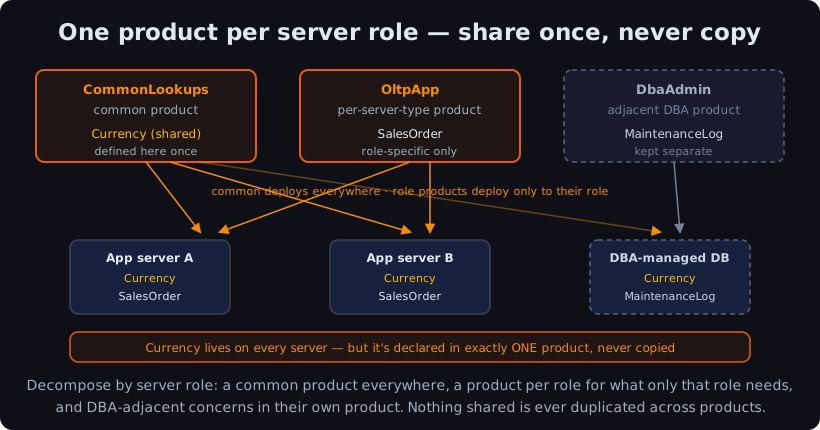
The payoff is the part you don’t see: no duplication. If that shared Currency table got copied into the app product and the reporting product and the DBA product, you’d own three definitions of one table. Edit one, forget the others, and they drift — and drift is the exact thing you came to SchemaSmith to kill. Declare it once in the common product and every role gets the same true copy.
Watch two products compose
Section titled “Watch two products compose”The lab ships two of the three products per engine — common (product CommonLookups, with a Currency lookup table) and appserver (product OltpApp, with a SalesOrder table). Both deploy into the same learn database, each by its own SchemaQuench run. The DBA product is the same move a third time; the lab leaves it as the exercise.
Deploy the common product first:
schemaquench --ConfigFile:deploy.settings.jsonBegin Quench of CommonLookupsValidate Server[localhost,11433].[learn] Adding new table [dbo].[Currency]Creating constraint [dbo].[Currency].[PK_Currency][localhost,11433].[learn] Successfully QuenchedCompleted quench of CommonLookupsValidate Server is the guardrail firing — ValidationScript confirmed learn exists on this server before a single object got built. Then the shared lookup table goes in. (PostgreSQL says Create new table public.Currency; MySQL says Create table `Currency` — same dialect tweaks you met in Course 1.)
Now the role product, into the same database:
schemaquench --ConfigFile:deploy.settings.jsonBegin Quench of OltpApp[localhost,11433].[learn] Adding new table [dbo].[SalesOrder]Creating constraint [dbo].[SalesOrder].[PK_SalesOrder]Successfully QuenchedCompleted quench of OltpAppHere’s the proof the boundary holds: deploying OltpApp added SalesOrder and left Currency completely alone. SchemaQuench only manages what each product declares. OltpApp never names Currency, so it never touches it. Two products, one database, one shared table — declared in exactly one place.
Re-run either one and you get the no-op: the declared state already matches, so the difference is zero and nothing new gets created. (Honest note: progress labels may still print on a clean re-run — you might see a constraint-check label line — even though no DDL runs and no duplicate is made. Read it as “nothing changed,” not “zero lines.”)
When the guardrail says no
Section titled “When the guardrail says no”Point a product at the wrong server and the gate does its job. Flip a ValidationScript to look for a database that isn’t there and run it:
Begin Quench of CommonLookupsValidate ServerSystem.Exception: Invalid server for this productExit code 3, and nothing in the database moved. The forge stayed cold because the metal was wrong. That’s the guardrail you’d aim at a production hostname, a known environment marker, or a baseline version to keep a package from ever quenching somewhere it shouldn’t.
Check yourself: You have one lookup-data template every server needs and another that's only for replication servers. How do you avoid duplicating the shared one?
Put the shared template in a common product deployed everywhere; put the role-specific template in a product per server type — so the shared one is defined once and deployed to all, never copied into each role.
Think of it as a rack of jigs, not one oversized blueprint. The common jig stamps every piece; each role jig shapes only its own; the DBA’s jig hangs on its own hook. One shared part, cut once, fitted everywhere — never re-cut three times to drift three ways. That’s a deployment you can reason about.
Got a boundary you’re not sure where to draw — does it belong in the common product or a role product? Email me at forgebarrett@schemasmith.com — I read every one.
Next up: Course 2 · Module 2 — Templates, where one product fans out across every database or schema a definition applies to, so a single quench run shapes a whole fleet at once.
Until then, may every product own its own corner of the fire and no two ever forge the same part twice.
— Forge