
Change schema and preview with WhatIf
Schemas never sit still. The Widget you built last module already needs more — a wider name, a price column. The old way: hand-write an ALTER TABLE, guard it so it doesn’t blow up if it’s already run, figure out whether prod is even in the state your ALTER expects, and slot one more script onto the pile. Let’s not. Let’s change the declaration, see exactly what SchemaSmith would do, and then let it do it.
Reshape the declaration
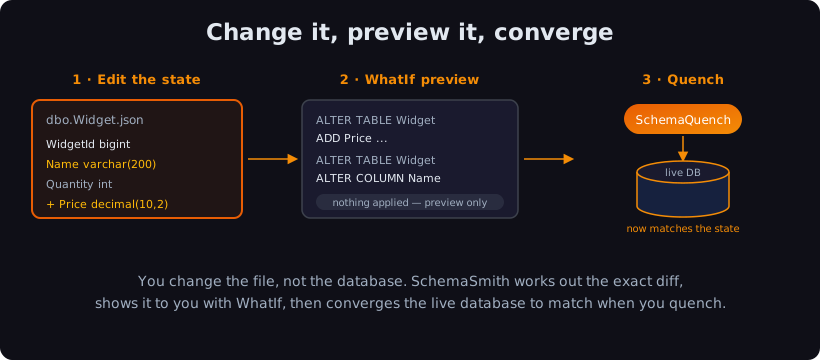
Section titled “Reshape the declaration”You don’t write the change. You change the shape you want and let the forge work out the change. Open the Widget table from Module 2 and edit two things — widen Name to 200, and add a Price column:
{ "Schema": "dbo", "Name": "Widget", "Columns": [ { "Name": "WidgetId", "DataType": "BIGINT" }, { "Name": "Name", "DataType": "NVARCHAR(200)" }, { "Name": "Quantity", "DataType": "INT", "Nullable": true }, { "Name": "Price", "DataType": "DECIMAL(10,2)", "Nullable": true } ], "Indexes": [ { "Name": "PK_Widget", "PrimaryKey": true, "Clustered": true, "IndexColumns": "WidgetId" } ]}That’s the whole edit. No ALTER TABLE, no IF COL_LENGTH(...) guard, no migration number. You changed 100 to 200 and added one line. The file still describes the destination — it just describes a slightly bigger one now. PostgreSQL and MySQL are the same edit with their own type names (the lab has all four).
Preview it first — WhatIf
Section titled “Preview it first — WhatIf”Here’s the part that changes how you deploy. Before you touch the database, you can ask SchemaSmith: what would you do? That’s WhatIf — a dry run. It computes the exact difference between your file and the live table and prints the SQL it would run, but applies none of it.
The lab ships a whatif.settings.json that’s identical to your deploy config with one line flipped — "WhatIfONLY": true. Run it:
schemaquench --ConfigFile:whatif.settings.json[localhost,11433].[learn] ALTER TABLE [dbo].[Widget] ADD [Price] DECIMAL(10,2) NULL;[localhost,11433].[learn] ALTER TABLE [dbo].[Widget] ALTER COLUMN [Name] NVARCHAR(200) NOT NULL;[localhost,11433].[learn] Successfully QuenchedThere it is — the two statements SchemaSmith worked out on its own, printed among the run’s [WhatIf] markers before a single byte of the table moves. (PostgreSQL prints ADD "Price" NUMERIC(10,2) and ALTER COLUMN "Name" SET DATA TYPE VARCHAR(200) — DECIMAL and NUMERIC are the same type there. MySQL prints ADD COLUMN \Price` DECIMAL(10,2) NULLandMODIFY COLUMN `Name` VARCHAR(200) NOT NULL`.)
Those [WhatIf] lines are built for a human reading the log. Add --report to the command and SchemaSmith writes the identical preview as a file — the same two changes, this time as data. Open its objectChanges section:
"run": { "mode": "WhatIf", "outcome": "Success", "exitCode": 0 },"whatIf": { "wouldApply": [], "wouldSkip": [], "wouldDeliver": [] },"objectChanges": { "instrumented": true, "created": { "tables": 0, "columns": 1, "indexes": 0, "constraints": 0, "foreignKeys": 0, "procedures": 0, "views": 0, "functions": 0 }, "modified": { "tables": 0, "columns": 1 }, "dropped": { "tables": 0, "indexes": 0, "constraints": 0, "foreignKeys": 0 }, "scriptsRan": 0, "details": [ { "objectType": "column", "objectName": "[dbo].[Widget].[Name]", "action": "wouldModify" }, { "objectType": "column", "objectName": "[dbo].[Widget].[Price]", "action": "wouldCreate" } ]}Same two changes, same verdict — Name marked wouldModify, Price marked wouldCreate — this time in the shape a CI gate can parse instead of scraping a log line. mode: WhatIf and an empty whatIf.wouldApply are the file swearing to the same thing the log implied: nothing behind those two entries actually happened.
And the table itself? Untouched. Check it and Name is still 100, with no Price in sight. WhatIf looked, did the math, told you the plan — and left the metal cold. Review the diff, and when it’s what you meant, deploy for real. Every setting behind WhatIf is in the SchemaQuench reference.
You don’t have to read the whole log, or parse a JSON file, to see the plan. Every run also writes SchemaQuench - Summary.md beside the logs — the human-readable recap of everything you just saw, built to be read top to bottom, not grepped. Open it and the same story is sitting right there under Object Changes:
## Object Changes- Created: tables=0, columns=1, indexes=0, constraints=0, foreignKeys=0, procedures=0, views=0, functions=0- Modified: tables=0, columns=1- Dropped: tables=0, indexes=0, constraints=0, foreignKeys=0- Ran (object scripts): 0On a two-line change like this one, Summary.md is overkill — you already read the log. Once a real deploy computes fifty changes across a dozen objects, Summary.md is where you look first, because a person can actually read it. Its twin SchemaQuench - Summary.json — the same file with the objectChanges block you just saw — carries the identical facts as a stable contract for a CI gate to parse instead. One receipt, two readers. (Full shape in the Deployment Summary Report reference.)
Check yourself: This WhatIf run's summary shows mode WhatIf, an empty would-apply list, and objectChanges naming the same two Widget changes the log printed. What does that combination actually prove?
That SchemaSmith computed a real diff against the live database — both changes named and counted — while applying none of it: the empty would-apply list and the still-unchanged catalog back each other up.
Quench the change
Section titled “Quench the change”Same package, the deploy config this time:
schemaquench --ConfigFile:deploy.settings.json[localhost,11433].[learn] Adding 1 new columns to [dbo].[Widget][localhost,11433].[learn] Altering Column [dbo].[Widget].[Name][localhost,11433].[learn] Successfully QuenchedCompleted quench of LearnConnectExactly the two changes WhatIf promised — no more, no less. The column’s added, the type’s widened, the primary key never moved. Run it again and you get silence: the declared state matches the database now, so the difference is zero. That’s the quench converging your table to the shape you drew.
Compare that to the migration way. There, evolving this table means writing the ALTER yourself, knowing precisely what state the target’s in, and adding script 006 to a chain you have to keep ordered forever. Here, you edited a file and previewed the result. SchemaSmith wrote the ALTER, checked the target for you, and applied only the gap.
Check yourself: What does WhatIf give you that running the deploy directly does not?
A preview of exactly the changes SchemaSmith would make, computed against the live database but without touching it — so you can review the diff before you apply.
Change the file, preview the diff, quench the difference. That’s the whole loop, and it’s the thing that makes declarative click: you never hand-write the change, and you never deploy one you haven’t seen first.
Got a gnarly table change you’re not sure how SchemaSmith would handle? Email me at forgebarrett@schemasmith.com — I read every one.
Next up: Module 4 — Bring an existing database under management. We flip the whole flow around — point SchemaTongs at a database that’s already out there and cast it into a package you can manage.
Until then, may every change ring true and your previews never surprise you.
— Forge